Thursday, August 18, 2016
Last Post using Blogger
Blogger has been great, but after a two year break from running my own site, I have chosen to start back with a custom blog at http://www.burksbrand.com.

Wednesday, July 27, 2016
Arcade Joystick
This idea has been a long time in the cooker. I've been wanting to put together an Arcade style joystick since my Commodore days. I finally just did it:
I ordered one of these from amazon:
"Easyget Zero Delay Pc Arcade Game Joystick Cabinet DIY Parts Kit for Mame Jamma & Fighting Games Support All Windows Systems - Color Black Kit"
It came today:

The unboxing.

It came in a bunch plastic bags.

Here are the parts fanned out.

A blurry one of me testing the joystick without the buttons on my computer before assembled it.

I found these on thingaverse. I printed them, but one of them snapped. I'm reprinting it with a higher fill density.
http://www.thingiverse.com/thing:723554
Raspberry Pi Arcade Stick Console

Crude markings for drilling.

The pieces drilled.

A trip to Ace hardware and I was ready to sand, paint, and assemble.

I thought I would test out some paints on the bottom piece which isn't very visible once assembled.

Here is the painted version without assembly.

Mostly assembled. I drilled holes for the joystick but after putting the hardware in I noticed the D-stick bumped one of the edges of the wall. instead I used some wood screws and re-centered stick.

Here we go hooked up. You can see the keyboard underneath. I'm going to add a wrist rest next.
After some advice from my long time friend I stumbled upon the joytokey software to get things working for games which don't support standard joysticks.
http://joytokey.net/en/
The joystick parts from amazon cost me 25 dollars and 10 dollars worth of search history sold to "Bing" for Amazon gift cards.
We had the wood left from a crib to outdoor couch project.
Then I spent about 10 dollars at Ace Hardware.
The risers I 3d printed from a giant orange spool of .175 I ordered for around $13 so I'll go ahead a say about .$.50 worth.
Total out of pocket $35ish. Not bad.
I ordered one of these from amazon:
"Easyget Zero Delay Pc Arcade Game Joystick Cabinet DIY Parts Kit for Mame Jamma & Fighting Games Support All Windows Systems - Color Black Kit"
It came today:

The unboxing.

It came in a bunch plastic bags.

Here are the parts fanned out.

A blurry one of me testing the joystick without the buttons on my computer before assembled it.

I found these on thingaverse. I printed them, but one of them snapped. I'm reprinting it with a higher fill density.
http://www.thingiverse.com/thing:723554
Raspberry Pi Arcade Stick Console

Crude markings for drilling.

The pieces drilled.

A trip to Ace hardware and I was ready to sand, paint, and assemble.

I thought I would test out some paints on the bottom piece which isn't very visible once assembled.

Here is the painted version without assembly.

Mostly assembled. I drilled holes for the joystick but after putting the hardware in I noticed the D-stick bumped one of the edges of the wall. instead I used some wood screws and re-centered stick.

Here we go hooked up. You can see the keyboard underneath. I'm going to add a wrist rest next.
After some advice from my long time friend I stumbled upon the joytokey software to get things working for games which don't support standard joysticks.
http://joytokey.net/en/
The joystick parts from amazon cost me 25 dollars and 10 dollars worth of search history sold to "Bing" for Amazon gift cards.
We had the wood left from a crib to outdoor couch project.
Then I spent about 10 dollars at Ace Hardware.
The risers I 3d printed from a giant orange spool of .175 I ordered for around $13 so I'll go ahead a say about .$.50 worth.
Total out of pocket $35ish. Not bad.
Wednesday, July 13, 2016
Teamspeak Install/Setup Instructions
Teamspeak Install/Setup Instructions
For Ubuntu
- Install PUTTY or SSH utility (optional)
- Install VirtualBox
- Download latest server ISO from Ubuntu.
- Provision the Virtual Machine to match or exceed the recommendations for minimum system specifications
- Attach the ISO and install
- use entire disk no LVM
- install updates automatically
- standard system utilities
- OpenSSH (optional)
- GRUB on boot is fine for dedicated VM
- Add port forwarding to your NAT
- map a port for SSH
- map a UDP port for client port 9987
- Install Guest Additions
- sudo mount -t iso9660 -o ro /dev/cdrom /media/cdrom
- cd /media/cdrom
- sudo apt-get -y install gcc make
- sudo ./VBoxLinuxAdditions.run
- sudo umount /media/cdrom
- sudo /sbin/shutdown -r now
- update os
- sudo apt-get update
- clone vm so you don't need to install ubuntu again
- setup a different host name for each full clone
- setup a different port for openSSH so you can boot a few up at once
- start headless virtualbox instance
- ssh with PuTTY or another tool
- install teamspeak-server
- Download from http://www.teamspeak.com/downloads
- Click the copy link
- wget and paste into putty
wget pastedurlhere - decompress the download
tar -xvf somedownload.bz2 - start the server
./ts3server_startscript.sh start - save off that screen that pops up it is important
- sign in from the TeamSpeak client
- add the network key from the screen that appeared
- set the teamspeak server to startup on server ``` crontab -e @reboot /path/to/decompressedlocation/ts3server_startscript.sh start
Sunday, July 10, 2016
Replacing MySQL with MariaDB
Get MariaDB SQL Up and Running
If you read the previous article you will see that we installed the LAMP stack as is. We are going to be removing the MySQL component today and replacing it with MariaDB.Remove MySQL
- Start the server in headless mode
- right click the context menu
- choose start headless
- SSH into it
- See what is installed
dpkg --get-selections | grep -v deinstall > installedFiles.txt - Open the file
... mysql-client-5.7 install mysql-client-core-5.7 install mysql-common install mysql-server install mysql-server-5.7 install mysql-server-core-5.7 install mysql-client-5.7 install mysql-client-core-5.7 install mysql-common install ... - Remove these with apt-get remove
- For the lazy and uncaring
   sudo apt-get remove  mysql*
   sudo apt-get autoremove
- For the lazy and uncaring
- remove /etc/mysql
- For the trusting and lazy (seriously be careful with any rm commands)
sudo rm -Rf /etc/mysql sudo rm -Rf /var/lib/mysql - You might find more like:
- /var/lib/mysql-5.7
- /var/lib/mysql-files
- /var/lib/mysql-keyrings
- For the trusting and lazy (seriously be careful with any rm commands)
sudo service mysql stop  #or mysqld
sudo killall -9 mysql
sudo killall -9 mysqld
sudo apt-get remove --purge mysql-server mysql-client mysql-common
sudo apt-get autoremove
sudo apt-get autoclean
sudo deluser mysql
sudo rm -rf /var/lib/mysql
sudo apt-get purge mysql-server-core-5.5
sudo apt-get purge mysql-client-core-5.5
sudo rm -rf /var/log/mysql
sudo rm -rf /etc/mysqlInstall MariaDB
sudo apt-get install --force-reinstall true mariadb-server
sudo mysql_secure_installation
Grant localhost
https://dev.mysql.com/doc/refman/5.5/en/adding-users.htmlFix the bind address
File:/etc/mysql/mariadb.conf.d/50-server.cnfbind-address:0.0.0.0VirtualBox
- map a port to connect
- if you want it locked to your host you could put a host IP of 127.0.0.1
Thursday, July 7, 2016
Apache on Ubuntu inside of VirtualBox Headless
Ubuntu LAMP Headless
- Install PUTTY or SSH utility (optional)
- Install VirtualBox
- Download latest server ISO from Ubuntu.
- Provision the Virtual Machine to match or exceed the recommendations for minimum system specifications
- Attach the ISO and install
- use entire disk no LVM
- install updates automatically
- standard system utilities
- LAMP server
- Set a MySQL password
- OpenSSH (optional)
- GRUB on boot is fine for dedicated VM
- Add port forwarding to your NAT
- map a port for SSH
- map a port for Web Traffic
- Install Guest Additions
- sudo mount -t iso9660 -o ro /dev/cdrom /media/cdrom
- cd /media/cdrom
- sudo apt-get -y install gcc make
- sudo ./VBoxLinuxAdditions.run
- sudo umount /media/cdrom
- sudo /sbin/shutdown -r now
- start headless virtualbox instance
- ssh with PuTTY or another tool
- Add Shared Directory for web
- create script to automap in /etc/init.d Sample Script:
#!/bin/bash sudo mount -t vboxsf PublicWeb /var/www/html - Make script executable
sudo chmod +x /etc/init.d/mountVBoxDirectories.sh - Update RC to run at start
sudo update-rc.d mountVBoxDirectories.sh defaults
- create script to automap in /etc/init.d Sample Script:
Saturday, May 14, 2016
Jekyll with Virtual Box and Network Mount
It appears when you have your files for Jekyll stored on the host machine on VirtualBox the files get cached and you receive a stale copy.
A simple solution is to "touch" the file.
A simple solution is to "touch" the file.
#!/bin/bash
echo "Touching all the things..."
find . -exec touch {} \;
echo "Finished Touching..."
jekyll serve
Wednesday, May 11, 2016
Synthesizers
After watching:
http://www.idreamofwires.org/
I was sold on the idea of obtaining a synthesizer. I had done a little research and realized it was going to be an expensive hobby. I decided I was going to get the cheapest thing possible:
http://www.thesynthesizersympathizer.com/2015/03/buying-your-first-analog-synthesizer.html
The MicroBrute. I found one for less than retail from an auction site.
I've been watching videos about synthesizers and found a tutorial:
https://www.youtube.com/watch?v=LBY-AtQwP_M
I'm pretty sure I need to find a EuroRack power module and begin collecting.
Here are some interesting modules I found:
http://www.analoguehaven.com/mfb/seq01/
https://www.youtube.com/watch?time_continue=273&v=xhNljvO0GCc
http://www.idreamofwires.org/
I was sold on the idea of obtaining a synthesizer. I had done a little research and realized it was going to be an expensive hobby. I decided I was going to get the cheapest thing possible:
http://www.thesynthesizersympathizer.com/2015/03/buying-your-first-analog-synthesizer.html
The MicroBrute. I found one for less than retail from an auction site.
I've been watching videos about synthesizers and found a tutorial:
https://www.youtube.com/watch?v=LBY-AtQwP_M
I'm pretty sure I need to find a EuroRack power module and begin collecting.
Here are some interesting modules I found:
http://www.analoguehaven.com/mfb/seq01/
https://www.youtube.com/watch?time_continue=273&v=xhNljvO0GCc
Wednesday, April 13, 2016
PowerShellFunctions
PowerShell Functions:
Recently I made a PowerShellFunctions. In a previous post I talked about one of the functions used Display-Calendar. I have since updated it to utilize the appropriate verb show. For a list of appropriate PowerShell verbs look no further than: Approved VerbsI have recently updated it to include:
- PS-Windows-Functions
- Sync-WindowsTime
- PS-File-Functions
- ConvertFrom-Base64
- ConvertTo-Base64
- Write-CompressedFiles
- PS-Calendar-Functions
- Show-Calendar
- PS-Structured-Query-Language-Functions
- Get-Sql
- Show-DatabasesWithTable
- PS-GUI-Functions
- Set-Clipboard
PS-Windows-Functions
Sync-WindowsTime
This starts the Windows Time service and calls w32tm /resyncWhy might you use such a command? Perhaps you dual boot and the time is off after rebooting.
See: KB2385818.
PS-File-Functions
ConvertTo-Base64
This takes a input and produces a Base64 string:Results in: TG9vayBvZiBkaXNhcHByb3ZhbA0K
ConvertFrom-Base64
Results in: Look of disapproval
Write-CompressedFiles
Takes a directoryPath and writes a zip file in the destinationFile location.I use this to zip up my module directory and save to my cloud:
PS-Calendar-Functions
Show-Calendar
Previous Blog PostPS-Structured-Query-Language-Functions
Get-Sql
This one is probably one of my favorite functions in the library. Here is an example:You can pipe it to something like:
Or make a query that calls a query:
Hopefully your database doesn't do that, but if it does it is nice to know PowerShell can handle it.
Show-DatabasesWithTable
Sometimes you need to find a database with a specific table:Gives you a list of databases with the appropriate table.
As we learned from the previous example you can chain these via the pipe line so you could run a query for each database.
Wednesday, April 6, 2016
How to make the most of archiving a web page to PDF
When you work in a technology industry and like to code your own pet projects there is often overlap. Sometimes when I am at work and I find an interesting to which article I would like to dedicate further research, I email myself a link.
When I don't have time to fully digest the page, I like to save the content for later. As the web is a dynamic ever changing environment often sites change owners, or newer content takes the place. I like to archive them into PDF.
Typically the web page is filled with clutter, but some browsers offer a "Reading Mode"
Internet Explorer 11:
https://blogs.msdn.microsoft.com/ie/2014/03/04/introducing-reading-view-in-ie-11/
Edge:
http://windows.microsoft.com/en-us/windows-10/getstarted-take-your-reading-with-you
Firefox (proposed):
https://wiki.mozilla.org/Reading_Mode
Chrome (also in the works)
http://lifehacker.com/enable-the-new-hidden-reader-mode-in-chrome-for-andro-1666469700
Turning on reader mode increases the quality of your archive through noise reduction.
When I don't have time to fully digest the page, I like to save the content for later. As the web is a dynamic ever changing environment often sites change owners, or newer content takes the place. I like to archive them into PDF.
Typically the web page is filled with clutter, but some browsers offer a "Reading Mode"
Internet Explorer 11:
https://blogs.msdn.microsoft.com/ie/2014/03/04/introducing-reading-view-in-ie-11/
Edge:
http://windows.microsoft.com/en-us/windows-10/getstarted-take-your-reading-with-you
Firefox (proposed):
https://wiki.mozilla.org/Reading_Mode
Chrome (also in the works)
http://lifehacker.com/enable-the-new-hidden-reader-mode-in-chrome-for-andro-1666469700
Turning on reader mode increases the quality of your archive through noise reduction.
Friday, April 1, 2016
Handling distractions when sleeping (For a Friend)
If you work in the IT operations industry for any length of time you probably will be "on call" at some point.
Being on call is typically a stressful time. You are constantly dreading the inevitable beep from your phone, or pager if your company is stuck in the mid-eighties. With a modern cellphone it is mostly used for more than one task. Some phones have a messenger application which might use the same ringtone as your phone.
A call at 3:00AM versus a Facebook Messenger message from one of your buddies who works the night shift can be just as stressful if you can't tell the difference.
Two of my close friends and I were in a group Facebook message. One of us works a regular business schedule. Another works the nightshift, another works a slightly different nightshift. One of us was on call this week and informed us that "It's my midnight.". I got to thinking about how to manage applications which provide interruptions in our sleep.
Assuming you don't get "on call" messages via Facebook Messenger here is how to manage it:
Find the gear icon on the application:

It is currently located on the top bar, but with the constant refining of the application it might change in the future.
After clicking the gear you will find yourself on the settings page:
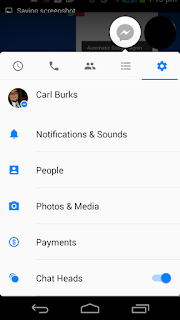
Click Notifications & Sounds:
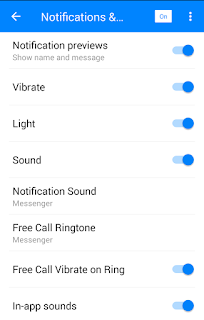
The "kill it with fire" choice is up at the top:

Simply sliding to off whilst you sleep might give you the best bang for your buck, but some of the other choices might be more appropriate, such as changing the sounds.
Being on call is typically a stressful time. You are constantly dreading the inevitable beep from your phone, or pager if your company is stuck in the mid-eighties. With a modern cellphone it is mostly used for more than one task. Some phones have a messenger application which might use the same ringtone as your phone.
A call at 3:00AM versus a Facebook Messenger message from one of your buddies who works the night shift can be just as stressful if you can't tell the difference.
Two of my close friends and I were in a group Facebook message. One of us works a regular business schedule. Another works the nightshift, another works a slightly different nightshift. One of us was on call this week and informed us that "It's my midnight.". I got to thinking about how to manage applications which provide interruptions in our sleep.
Assuming you don't get "on call" messages via Facebook Messenger here is how to manage it:
Find the gear
 icon on the application:
It is currently located on the top bar, but with the constant refining of the application it might change in the future.
After clicking the gear you will find yourself on the settings page:

Click Notifications & Sounds:

The "kill it with fire" choice is up at the top:

Simply sliding to off whilst you sleep might give you the best bang for your buck, but some of the other choices might be more appropriate, such as changing the sounds.
Saturday, March 12, 2016
Calendar In Powershell
I've added a new Repo on GitHub for making a calendar in PowerShell, much like the Linux command cal. I have omitted multi-language support and have opted to only implement the core functionality of displaying a calendar rather than also including the date of Easter.
https://github.com/crb02005/PowerShellFunctions/blob/master/calendar.ps1
Tuesday, March 8, 2016
Visual Studio Debugging
If you are a VB.NET developer for any length of time you probably will need to debug code. One of the tools I use is the Immediate Window. CTRL-ALT-I will open it. If you use the ? shortcut to print the value of a variable with multiple lines you probably get something like "Blah"+vbnewline+"someotherfield", but with the string formatter ",nq" you can get the following:
Blah
someotherfield
I hope this helps.
Blah
someotherfield
I hope this helps.
Monday, February 8, 2016
EVE Online
I recently started playing a popular space game. EVE Online.
If you've never heard of the game, I would suggest going to YouTube and look at a few videos.
Here is a trailer:
I had joined a corp and they wanted to get a list of all their player's assets. I created a PowerShell Script specifically for that purpose.
This one requires setting up your API key:
Skill Script:
https://gist.github.com/anonymous/0bc8bd3da21cd217fb70
This one shouldn't need any special permissions:
Sector Script:
https://gist.github.com/anonymous/998410deed0c0efb7e51
The script above lists the solar systems along with some interest data. Kills, Warps, and Corporation Ownership.
Note:
To view all just use:
$solarSystems.Values
Since it is PowerShell you can harness the Pipeline to find quite spaces and put them in a CSV file:
$solarSystems.Values | %{if($_.ShipJumps -lt 3 -and $_.ShipKills -eq 0){$_}} | export-csv "your file path.csv"
If you decide you want to try it sign up for a free trial below:
Click on my Buddy link and sign up for a free trial:
https://secure.eveonline.com/trial/?invc=967f06ed-54cd-4294-8db7-500eed4154b5&action=buddy
If you've never heard of the game, I would suggest going to YouTube and look at a few videos.
Here is a trailer:
I had joined a corp and they wanted to get a list of all their player's assets. I created a PowerShell Script specifically for that purpose.
This one requires setting up your API key:
Skill Script:
https://gist.github.com/anonymous/0bc8bd3da21cd217fb70
This one shouldn't need any special permissions:
Sector Script:
https://gist.github.com/anonymous/998410deed0c0efb7e51
The script above lists the solar systems along with some interest data. Kills, Warps, and Corporation Ownership.
Note:
To view all just use:
$solarSystems.Values
Since it is PowerShell you can harness the Pipeline to find quite spaces and put them in a CSV file:
$solarSystems.Values | %{if($_.ShipJumps -lt 3 -and $_.ShipKills -eq 0){$_}} | export-csv "your file path.csv"
If you decide you want to try it sign up for a free trial below:
Click on my Buddy link and sign up for a free trial:
https://secure.eveonline.com/trial/?invc=967f06ed-54cd-4294-8db7-500eed4154b5&action=buddy
Sunday, November 22, 2015
Minecraft: The Castle that commands and command blocks built
My middle son was playing Minecraft and wanted a command block. He didn't really know what they were or what they did but he wanted one. I did a little research and found you have to use a command to get a command block.
/give YOUR_PLAYER_NAME_HERE command_block COUNT_DEFAULTS_TO_ONE
This gives the player listed the number of command blocks specified. If no number was specified it defaults to one.
If you wanted 47 diamonds you would do something like:
/give YOUR_PLAYER_NAME_HERE diamond 47
Once you have mastered that you can move on to the next phase.
Targeting the nearest player. Instead of targeting a specific player you can target the nearest with @p
/give @p command_block
That gives the nearest player a command block. Pretty handy.
If you place a command_block and put a button on it you execute the command with the press of the button.
I have made a command_button giver:

And the command:
 *Note Previous Output user name removed.
So this is moderately interesting. You could use a dispenser for this but you would have to keep filling it up. This is a close enough to infinite item spawner.
You can also fill an area with an item. If you fill it with air you can clear a flat space to build a base. This is useful if you want a flat area to build on, but like the surrounding terrain, versus the super flat world.
Fill works thusly:
/fill X Y Z X Y Z ITEM_TO_FILL
Why did I put X Y Z twice? It is a range. This range can be a single block if the numbers are the same or a column, or row, or a cube.
To build my castle I cleared a bit of terrain. To find the X Y Z press "F3" on your keyboard. It shows the position of you in XYZ, and the block in Block.

To hide the debug window press "F3" again. Through a bit of trial and error you will soon be an expert in three dimensional coordinates.
This page has a pretty comprehensive list of items:
http://www.minecraftinfo.com/IDList.htm
An important item to remember is "air" that lets you clear a space. I cleared a big cube to start. Then I added walls. The only bit that wasn't added was the crenellations.


Okay that was fun but what about making some monsters?
/summon CREATURE_NAME X Y Z

/give YOUR_PLAYER_NAME_HERE command_block COUNT_DEFAULTS_TO_ONE
This gives the player listed the number of command blocks specified. If no number was specified it defaults to one.
If you wanted 47 diamonds you would do something like:
/give YOUR_PLAYER_NAME_HERE diamond 47
Once you have mastered that you can move on to the next phase.
Targeting the nearest player. Instead of targeting a specific player you can target the nearest with @p
/give @p command_block
That gives the nearest player a command block. Pretty handy.
If you place a command_block and put a button on it you execute the command with the press of the button.
I have made a command_button giver:

And the command:

So this is moderately interesting. You could use a dispenser for this but you would have to keep filling it up. This is a close enough to infinite item spawner.
You can also fill an area with an item. If you fill it with air you can clear a flat space to build a base. This is useful if you want a flat area to build on, but like the surrounding terrain, versus the super flat world.
Fill works thusly:
/fill X Y Z X Y Z ITEM_TO_FILL
Why did I put X Y Z twice? It is a range. This range can be a single block if the numbers are the same or a column, or row, or a cube.
To build my castle I cleared a bit of terrain. To find the X Y Z press "F3" on your keyboard. It shows the position of you in XYZ, and the block in Block.

To hide the debug window press "F3" again. Through a bit of trial and error you will soon be an expert in three dimensional coordinates.
This page has a pretty comprehensive list of items:
http://www.minecraftinfo.com/IDList.htm
An important item to remember is "air" that lets you clear a space. I cleared a big cube to start. Then I added walls. The only bit that wasn't added was the crenellations.

Using this fill command you can make gates open and close as well as drawbridges.

You can connect the blocks together for multiple effects using redstone wire. If you want a delay use a redstone repeater.

Here is my close gate and remove the draw bridge.


You can even make a convertible castle:


Okay that was fun but what about making some monsters?
/summon CREATURE_NAME X Y Z

Wednesday, November 18, 2015
Using an ultrasonic sensor with a Rasberry Pi
I was helping a friend build a robot the other day and he was having difficulty with the ultra sonic sensor. I offered to test it on my Pi which a "B" model. I followed this guide:
http://www.bytecreation.com/blog/2013/10/13/raspberry-pi-ultrasonic-sensor-hc-sr04
I had to alter the timeout of the code to a full 1 second to get valid results. Also I had to adjust the GPIO pins used to the ones that I actually used to hook up.
It worked out nicely:


http://www.bytecreation.com/blog/2013/10/13/raspberry-pi-ultrasonic-sensor-hc-sr04
I had to alter the timeout of the code to a full 1 second to get valid results. Also I had to adjust the GPIO pins used to the ones that I actually used to hook up.
It worked out nicely:


Monday, September 28, 2015
Random Tables Update IV
I was able to connect the Azure site to Google Domains and left it running for a week or two and it worked fine. I have since shut it down the Azure application and removed the Storage files from the cloud. The repos are available on GitHub per my previous post. Development has stopped for the common library and the Web Portal until bugs are reported. I may update the data packs at a later date, but have begun to work on other projects until demand increases.
Wednesday, September 9, 2015
Random Tables Update III
I have split the repo into three parts:
RandomTablesCommon - portable library imported as a submodule into the other repos.
https://github.com/crb02005/RandomTablesCommon
RandomTablesUniversal - Windows 10 Universal app. It imports RandomTablesCommon as a submodule.
https://github.com/crb02005/RandomTablesUniversal
RandomTables - Web Application. It imports RandomTablesCommon as a submodule.
https://github.com/crb02005/RandomTables
I had a chat with some friends of mine Monday and I might have some content contributors after I get the Web port on the web. After I get things stabilized I might shift focus to community building. Adding creative common content will make this product really useful.
Now time for a small bit about BOM.
Byte Order Mark (BOM) is optionally included on UTF-8 files.
This goes unnoticed until your JSON parser stops working. With my latest development for Random Tables I started yet another implementation of a string provider. The Azure Blob string provider uses a memory stream to read the file.
The Windows 10, and System.IO.readAllText seem to chomp the BOM and it worked flawlessly. Reading from the memory stream it is a bit more manual. BOM's are easy to forget until they "Byte" you.
http://www.w3.org/International/questions/qa-byte-order-mark.en.php
RandomTablesCommon - portable library imported as a submodule into the other repos.
https://github.com/crb02005/RandomTablesCommon
RandomTablesUniversal - Windows 10 Universal app. It imports RandomTablesCommon as a submodule.
https://github.com/crb02005/RandomTablesUniversal
RandomTables - Web Application. It imports RandomTablesCommon as a submodule.
https://github.com/crb02005/RandomTables
Since I split the modules I went ahead and got a domain name. I'll announce it once I have the site up. I am working on making the Web App work on the Azure platform. This means I had to add yet another string provider. I haven't committed my changes which add Azure features. I am still developing that piece.
Azure has blob storage, and many other cool features. Here is an article I've been reading about the topic:
Here is a NuGet package:
I had a chat with some friends of mine Monday and I might have some content contributors after I get the Web port on the web. After I get things stabilized I might shift focus to community building. Adding creative common content will make this product really useful.
Now time for a small bit about BOM.
Byte Order Mark (BOM) is optionally included on UTF-8 files.
This goes unnoticed until your JSON parser stops working. With my latest development for Random Tables I started yet another implementation of a string provider. The Azure Blob string provider uses a memory stream to read the file.
The Windows 10, and System.IO.readAllText seem to chomp the BOM and it worked flawlessly. Reading from the memory stream it is a bit more manual. BOM's are easy to forget until they "Byte" you.
http://www.w3.org/International/questions/qa-byte-order-mark.en.php
Friday, September 4, 2015
Carl Burks' Random Tables Progress
I've made a bit more progress on my application.
I am working on adding a feature to support multiple data directories in the web version. This will keep things organized a little better and will make it easier to drop in content packs. I also registered a domain for this application and have researched hosting. After I finish adding the feature I plan to fork the code base and create a repo for each major part:
Portable Library
Windows 10 Port
Web Port
Further I will add a repo for the Creative Commons Share-Alike Attribution Non-commercial data pack.
Next feature will be to add logic for custom attribution display messages for the Web Port and corresponding parsing instructions to the Portable Library.
After these are developed I will hopefully setup the web facing application.
I will then split my time for this project between adding features, adding tables to the CC repo, adding content to the publisher packs which have given permission.
As a side note, Bing seems to hate blogger.com searching for my name, "Carl Burks", doesn't show any blogger.com links and shows a bunch of spammy unrelated content. I'm trying an experiment by adding my name to post title to see if that improves things.
I am working on adding a feature to support multiple data directories in the web version. This will keep things organized a little better and will make it easier to drop in content packs. I also registered a domain for this application and have researched hosting. After I finish adding the feature I plan to fork the code base and create a repo for each major part:
Portable Library
Windows 10 Port
Web Port
Further I will add a repo for the Creative Commons Share-Alike Attribution Non-commercial data pack.
Next feature will be to add logic for custom attribution display messages for the Web Port and corresponding parsing instructions to the Portable Library.
After these are developed I will hopefully setup the web facing application.
I will then split my time for this project between adding features, adding tables to the CC repo, adding content to the publisher packs which have given permission.
As a side note, Bing seems to hate blogger.com searching for my name, "Carl Burks", doesn't show any blogger.com links and shows a bunch of spammy unrelated content. I'm trying an experiment by adding my name to post title to see if that improves things.
Tuesday, September 1, 2015
Random Table Portable Library, Windows 10 Application, and Web Port in C#
Yesterday, I checked in a project I've spent a few weeks playing with:
https://github.com/crb02005/RandomTables
Tables - Space Craft Encounters (1d6)
1-2 No Encounter
3 Shuttlecraft
4 Some kind of cargo freighter
5 Assault Craft
6 Roll on Unusual Space Craft Encounters
You would roll a standard six sided die and get a result. This is fairly straight forward roll a one or two and nothing happens. Roll a three and get a shuttlecraft. Roll a four and get a cargo freighter. Roll a five get an assault craft. Roll a six, you would need to look at another table and roll on that. Depending on your game system this can be a somewhat tedious process. It is also difficult to organize multiple publishers of books tables and connect them.
My software solves many of these problems. Currently only sample JSON files are included, but I am working on creating useful game system independent data-packs for my utility. I have also contacted several publishers and requested permission to create data packs.
I've contacted AEG, Steve Jackson Games, Fantasy Flights, Troll Lords and Green Ronin. So far I've heard back from AEG and Steve Jackson Games. Both companies were polite and helpful.
AEG indicated if I was not making any money then they were fine with creation.
Steve Jackson Games online policy indicates that they will only allow tables already published.
I plan on adding tables from both provided I have time. I will need to thoroughly research publicly available tables for SJG and that will take some time.
How can I get this program you might be asking yourself. Currently I have a common library that is used by the Windows 10 Application and the Web application. I've currently got some test coverage. Until bugs are reported I plan on spending time adding content in the form of JSON files. I have a few minor features I'm planning on adding, but the core application I believe covers most cases. The application is written in C#. Given time and interest I might make a port to another language. After some additional testing I might look for hosting and deploy the web app.
https://github.com/crb02005/RandomTables
Tables - Space Craft Encounters (1d6)
1-2 No Encounter
3 Shuttlecraft
4 Some kind of cargo freighter
5 Assault Craft
6 Roll on Unusual Space Craft Encounters
You would roll a standard six sided die and get a result. This is fairly straight forward roll a one or two and nothing happens. Roll a three and get a shuttlecraft. Roll a four and get a cargo freighter. Roll a five get an assault craft. Roll a six, you would need to look at another table and roll on that. Depending on your game system this can be a somewhat tedious process. It is also difficult to organize multiple publishers of books tables and connect them.
My software solves many of these problems. Currently only sample JSON files are included, but I am working on creating useful game system independent data-packs for my utility. I have also contacted several publishers and requested permission to create data packs.
I've contacted AEG, Steve Jackson Games, Fantasy Flights, Troll Lords and Green Ronin. So far I've heard back from AEG and Steve Jackson Games. Both companies were polite and helpful.
AEG indicated if I was not making any money then they were fine with creation.
Steve Jackson Games online policy indicates that they will only allow tables already published.
I plan on adding tables from both provided I have time. I will need to thoroughly research publicly available tables for SJG and that will take some time.
How can I get this program you might be asking yourself. Currently I have a common library that is used by the Windows 10 Application and the Web application. I've currently got some test coverage. Until bugs are reported I plan on spending time adding content in the form of JSON files. I have a few minor features I'm planning on adding, but the core application I believe covers most cases. The application is written in C#. Given time and interest I might make a port to another language. After some additional testing I might look for hosting and deploy the web app.
Sunday, June 14, 2015
Octodad: Dadilest Catch
I bought this game on Steam as an early father's day present to myself. Steam was running their summer sale and I had looked at the title of this game, but I hadn't watched the trailer once I did I knew I had to have it. It is an amazingly unique hilariously game which is also family friendly. I have added this to the list of games I've beaten. It was totally worth the price.
Subscribe to:
Posts (Atom)